Since I'm working on updating my blog, I am going to move the links to other blogs here to this post. That way I still have them but they don't take up valuable property on the side of my blog.
http://drzreflects.blogspot.com/ (Don't worry Dr. Z, I will never get rid of your blog!)
http://unigrl.blogspot.com/
http://koreshkova.blogspot.com/
http://lalindell.blogspot.com/
http://smdukes.blogspot.com/
http://eitbr.blogspot.com/
http://stephenwa.blogspot.com/
http://salworld07.blogspot.com/
http://entermyworldthroughmythoughts.blogspot.com/
http://pochesthoughts.blogspot.com/
http://patrickiisreflections.blogspot.com/
Wednesday, October 8, 2008
Answers to 'Taking Stock'
 This semester I’m taking Principles of Publication Design. Currently we are reading the book Learning Web Design by Jennifer Niederst Robbins. In one of her exercises she asks the reader to reflect on a few items. The following are my responses.
 What are your web design goals? My overall goal in any class I take is always the same—to become better at what I am doing so that I can teach my students better. Since I already teach a basic level web design class, my web design goals are to make my students future web designers.
 Which aspects of web design interest you the most? It is hard for me to narrow down to just one aspect; the one I know the most about is the ‘structure layer’. I would like to learn about the ‘behavior layer’ since this is something I know little about and I would like to be able to do the whole process someday.
 What current skills do you have that will be useful in creating web pages? Beside that fact I already know some basic html and understand the rules of xml, I also have a few personal skills that give me an advantage. I teasingly say that I am OCD. It comes in handy when students can’t get a page to work properly, I can look at their lines of code and spot the problem pretty quickly. Most students can’t understand how I see the little missing “ or / or <
 Which skills will you need to brush up on? My knowledge of currently used tags is out of date. I don’t enjoy researching new tags like my students. I know I need to see what is currently being used and update my code knowledge. I also need to become better at using a database. I only have to teach such a basic level of database that I fear I will never get enough interest going to learn what I would need to become ‘professional’ at that part of web design.
 Which hardware and software tools do you already have for web design? At my school I have access to PhotoShop and Notepad. I’m learning along side my students to use PhotoShop and I am grateful that I did not have to pay for the program. I find that I use it for other projects too.

What tools do you need to buy? I would like my school to buy some kind of web page authoring tool. We currently only use Notepad to write up our code for our pages. Though, it does force me to know how to code better.
Monday, October 6, 2008
At it again!
Just getting my blog dusted off for another UNI class. I wish I had time to keep up with this blog and add all the interesting ideas I learned last semester but so goes a graduate college student with a full time job and full time family. I will be back with more...
Tuesday, November 27, 2007
Blogs in High School Video
The below video was created for My Emerging Technologies class. I wanted to show case the work my Intro to Computers II class was doing on blogging. Originally my intention was to make video for my UNI class only, but I think it will be a fun way to intro my blog unit with my high school students. Next semester I will show the video to my Intro to Computers II sections. The goal of the video was to show what my students and fellow teachers use blogging for and what they like about blogging. I did not get the answers I was expecting from the students, so I just I changed the focus to be just a fun video on blogging. Watch the video and have a little fun. The link at youtube: http://www.youtube.com/watch?v=v4SjU_1VNPM
Monday, November 19, 2007
Poverty Elimination Project
In my UNI classes, projects have been discussed that bring technology to students in areas of the world where technology would greatly impact the way of life for students. In Dr. Z's http://drzreflects.blogspot.com/ blog on OLPC Computer: Buy One, Keep One he talks about such a project. If you have not heard about the project, I suggest that you take a look.
I found this article http://www.citrus.unitec.ac.nz/projects/peru_cic.html
about the Centre for Information Technology Research Unitec New Zealand's POVERTY ELIMINATION PROJECT.
Description from the article: "Networking remote communities to high value activities and markets through a system of telecenters and education. This project is aimed at the sustainable relief of poverty in remote agricultural areas of Peru with high indigenous populations. By providing communication tools, local telecentres and training to these remote communities we enable other groups in the community to benefit, including education, health, local governance, new business initiatives and eco-tourism."
I found this article http://www.citrus.unitec.ac.nz/projects/peru_cic.html
about the Centre for Information Technology Research Unitec New Zealand's POVERTY
 ELIMINATION PROJECT.
Description from the article: "Networking remote communities to high value activities and markets through a system of telecenters and education. This project is aimed at the sustainable relief of poverty in remote agricultural areas of Peru with high indigenous populations. By providing communication tools, local telecentres and training to these remote communities we enable other groups in the community to benefit, including education, health, local governance, new business initiatives and eco-tourism."
"Project objectives:
- To provide the tools and training to connect remote agricultural communities to existing planting and harvesting advice and market information of the Ministry of Agriculture in Peru (Ministerio de Agricultura).
- To use these tools and training to provide remote agricultural communities access to higher valued business initiatives and social support systems in education, health and governance.
- To provide remote agriculture communities access to training and expertise resources."
There are many other projects out there that are designed to bring a computer to a student. It would be neat for my West High students to raise money and buy a computer for a student in a country far from Iowa. My students then could communicate with the student and learn about other cultures while learning to be better society members.
See my previous posting on 1:1 computing for more info http://radtechnobysarah.blogspot.com/search/label/1:1%20computing
Photo at http://www.citrus.unitec.ac.nz/projects/peru_images/it0030.html
Sunday, November 18, 2007
Planning for Neomillennial Learning Styles
There is a lot of talk about how students are different than they used to be. It seems like every generation thinks the generation before them is different than them. I just think that with technology advancing at such a high rate, the differences seem to be changing at this same fast rate. I see, in my classroom, students changing just in the eight years I have been teaching. However, not all of these changes I would account to their different learning needs. Many changes are due to the changing expectations of students from society and from their parents--not always a positive change in expectation.
 I was reading another classmate's blog http://lalindell.blogspot.com/ and she was discussing the following article by Chris Dede.
http://www.educause.edu/ir/library/pdf/eqm0511.pdf
which is about Planning for Neomillennial Learning Styles. Shifts in students' learning style will prompt a shift to active construction of knowledge through mediated immersion.
I found this site about learning styles for teachers. http://otec.uoregon.edu/learning_styles.htm It has many other links. On one of the first links http://www.howtolearn.com/ you can find out what your learning style is. My results for Learning Style Preferences:
36% Visual Learner
27% Auditory Learner
36% Kinesthetic Learner
This learning style site offers newsletters about strategies for students and teachers that deal with knowing your own learning style. I signed-up for a few and have received three emails. I will caution anyone who doesn't like to get a lot of email not to sign-up for the automatic email newsletters.
 I was reading another classmate's blog http://lalindell.blogspot.com/ and she was discussing the following article by Chris Dede.
http://www.educause.edu/ir/library/pdf/eqm0511.pdf
which is about Planning for Neomillennial Learning Styles. Shifts in students' learning style will prompt a shift to active construction of knowledge through mediated immersion.
I found this site about learning styles for teachers. http://otec.uoregon.edu/learning_styles.htm It has many other links. On one of the first links http://www.howtolearn.com/ you can find out what your learning style is. My results for Learning Style Preferences:
36% Visual Learner
27% Auditory Learner
36% Kinesthetic Learner
This learning style site offers newsletters about strategies for students and teachers that deal with knowing your own learning style. I signed-up for a few and have received three emails. I will caution anyone who doesn't like to get a lot of email not to sign-up for the automatic email newsletters.
Photo at http://brianhaveri.com/images/posts/baby_at_computer.jpg
Friday, November 16, 2007
Cell Phones in the Classroom
A fellow classmate's http://smdukes.blogspot.com/ thoughts about cell phone use in the classroom is based on the following article http://teachingtoday.glencoe.com/howtoarticles/cell-phones-in-the-classroom
I found an article about another school's cell phone policy at http://www.usatoday.com/tech/news/2002/01/21/schools-cell-phones.htm
(The site said it could not be republished so you will have to go read it yourself.)
My school's "STUDENT USE OF CELL PHONES, BEEPERS, AND PERSONAL LISTENING DEVICES policy: The Faculty of West High School have developed the following building wide guidelines, regarding student use of cell phones, beepers, and personal listening devices during the school day, in an effort to be consistent and fair:
• Students must keep all phones, beepers, and personal listening devices turned off and out of sight from bell to bell, or 7:45 am to 2:35 pm.
• Cell phone or classroom phones may not be used in the classroom, unless the teacher or staff member has given special permission.
• In the event that a student is using any items during school hours without prior permission, the staff member will confiscate the item and turn it into the main office.
• The item will be returned to the student at the end of the school day, the first time the student violates protocol.
• Second offense shall require a parent/guardian to retrieve the item from the school.
• Subsequent offenses will be turned over to the student’s grade level administrator for further consequences.
PLEASE NOTE: As per the Student Conduct Code 504.3-R photographic cell phones (cameras) will be banned from use in all district facilities. This includes restrooms, locker rooms, gym classes, theaters, and activity practices."
The policy can be found at http://westhigh.waterloo.k12.ia.us/student_use_of_cell_phones
The balance between using cell phones at school and banning cell phones at school will take a while to find. I think that using cell phones at College versus in High School is not the same issue. For right now I am on the side of banning the use of phones during class time. It is too distracting for most students. Most high school aged students are in the world of all or nothing. We can teach them respectful use of cell phones for the classroom, but it usually boils down to that if they have a cell phone they are going to use it. I am sure this topic will be discussed more and more as cell phones also become our personal computers. See my previous posting http://radtechnobysarah.blogspot.com/search/label/Horizon%20Report for more info about cell phone use in the Horizon Report 2007.
Photo at http://joplinnews.scottjoplinschool.org/photos/uncategorized/cellphone1.gif
 the classroom is based on the following article http://teachingtoday.glencoe.com/howtoarticles/cell-phones-in-the-classroom
I found an article about another school's cell phone policy at http://www.usatoday.com/tech/news/2002/01/21/schools-cell-phones.htm
(The site said it could not be republished so you will have to go read it yourself.)
My school's "STUDENT USE OF CELL PHONES, BEEPERS, AND PERSONAL LISTENING DEVICES policy: The Faculty of West High School have developed the following building wide guidelines, regarding student use of cell phones, beepers, and personal listening devices during the school day, in an effort to be consistent and fair:
• Students must keep all phones, beepers, and personal listening devices turned off and out of sight from bell to bell, or 7:45 am to 2:35 pm.
• Cell phone or classroom phones may not be used in the classroom, unless the teacher or staff member has given special permission.
• In the event that a student is using any items during school hours without prior permission, the staff member will confiscate the item and turn it into the main office.
• The item will be returned to the student at the end of the school day, the first time the student violates protocol.
• Second offense shall require a parent/guardian to retrieve the item from the school.
• Subsequent offenses will be turned over to the student’s grade level administrator for further consequences.
PLEASE NOTE: As per the Student Conduct Code 504.3-R photographic cell phones (cameras) will be banned from use in all district facilities. This includes restrooms, locker rooms, gym classes, theaters, and activity practices."
The policy can be found at http://westhigh.waterloo.k12.ia.us/student_use_of_cell_phones
The balance between using cell phones at school and banning cell phones at school will take a while to find. I think that using cell phones at College versus in High School is not the same issue. For right now I am on the side of banning the use of phones during class time. It is too distracting for most students. Most high school aged students are in the world of all or nothing. We can teach them respectful use of cell phones for the classroom, but it usually boils down to that if they have a cell phone they are going to use it. I am sure this topic will be discussed more and more as cell phones also become our personal computers. See my previous posting http://radtechnobysarah.blogspot.com/search/label/Horizon%20Report for more info about cell phone use in the Horizon Report 2007.
Photo at http://joplinnews.scottjoplinschool.org/photos/uncategorized/cellphone1.gif
Tuesday, November 13, 2007
My Blog at School
This is the address http://levenduskythecomputerteacher.blogspot.com/ for my blog at school that I created so parents or students can check their missing assignments. 
At conferences, I always start by asking parents what their student has told them about our class. Usually the answer is "nothing". I hope my blog can help parents and their students strike up a dialog about what is going on in our class. Since most of the work we do in the class must be done at school, for a variety of reasons, I don't foresee that the blog will be used too much for missing work. However, even if one student a week can use the information to help keep up with the class, it will be worth my time to update it.
Fun Fact: I put a poll on the site to see if parents would let me know how many use the site.
Some ideas about what to do with blogs at school can be found at http://escrapbooking.com/blogging/teaching.htm
Found on the site "The Purpose and Learning Outcomes. What's the purpose of the blog? Why is the blog format being used?
Learning Outcome. What are the specific learning outcomes? What's the objective of the lesson(s)? What standards are being addressed? When used in teaching and learning, the educational outcomes must be clear to the students. This is more than I have done with blogs as of yet.
Information. What information will be shared? Where will this information originate? Most blogs are used to share information including facts, data, statistics, links to other resources, opinions, and much more. In addition to text, the blog could contain audio, video, and visuals.
Process or Product. Is the blog mostly about process or product? Blogs are often used by teachers as a tool to document the information inquiry process. I did require students to put links to additional information and sources when they created their own blog. My blog doesn't have a link as of yet.
Reflection. Blogs can be used as a meta cognitive tool to help people think about their life or learning. These reflections may be intended for themselves, their classmates, or the world. Another activity I had my students do on their blog was to reflect on a Newsweek article they read.
Interaction. Some blogs focus on communication between the person posting the entry and the people making comments. The responses may include additional information, expanded ideas, or critiques. Sometimes the most important aspect of the blog is questioning. With young children, the interaction is often between the child and the teacher. I required students to comment on their fellow classmates' blogs (at least four people per assignment). If the students could not find something worth while to comment on they could skip that person's blog. This made it more important for everyone to write well.
Assessment. Do the learning outcomes match the assessment? Sometimes blogs are used as a tool for assessment to check student understanding. Bloggers may be asked to state facts, analyze an article, or express their understandings." As of now I have not set-up a very good system to assess student blogs.
Photo is a print screen of my blog.

At conferences, I always start by asking parents what their student has told them about our class. Usually the answer is "nothing". I hope my blog can help parents and their students strike up a dialog about what is going on in our class. Since most of the work we do in the class must be done at school, for a variety of reasons, I don't foresee that the blog will be used too much for missing work. However, even if one student a week can use the information to help keep up with the class, it will be worth my time to update it.
Fun Fact: I put a poll on the site to see if parents would let me know how many use the site.
Some ideas about what to do with blogs at school can be found at http://escrapbooking.com/blogging/teaching.htm
Found on the site "The Purpose and Learning Outcomes. What's the purpose of the blog? Why is the blog format being used?
Learning Outcome. What are the specific learning outcomes? What's the objective of the lesson(s)? What standards are being addressed? When used in teaching and learning, the educational outcomes must be clear to the students. This is more than I have done with blogs as of yet.
Information. What information will be shared? Where will this information originate? Most blogs are used to share information including facts, data, statistics, links to other resources, opinions, and much more. In addition to text, the blog could contain audio, video, and visuals.
Process or Product. Is the blog mostly about process or product? Blogs are often used by teachers as a tool to document the information inquiry process. I did require students to put links to additional information and sources when they created their own blog. My blog doesn't have a link as of yet.
Reflection. Blogs can be used as a meta cognitive tool to help people think about their life or learning. These reflections may be intended for themselves, their classmates, or the world. Another activity I had my students do on their blog was to reflect on a Newsweek article they read.
Interaction. Some blogs focus on communication between the person posting the entry and the people making comments. The responses may include additional information, expanded ideas, or critiques. Sometimes the most important aspect of the blog is questioning. With young children, the interaction is often between the child and the teacher. I required students to comment on their fellow classmates' blogs (at least four people per assignment). If the students could not find something worth while to comment on they could skip that person's blog. This made it more important for everyone to write well.
Assessment. Do the learning outcomes match the assessment? Sometimes blogs are used as a tool for assessment to check student understanding. Bloggers may be asked to state facts, analyze an article, or express their understandings." As of now I have not set-up a very good system to assess student blogs.
Photo is a print screen of my blog.
Friday, November 9, 2007
Student Project Example
The following is an example of a student's project in my Intro to Computers II class where students were asked to pick three emerging technologies, research the products, and then present what they found to the class. This example was written by my student A.M. and edited by E.W.
"Second Life is a 3D online community. It is comprised of over 9 million online use rs from around the globe, inhabiting their own virtual land and developing on it. When you think you have had enough of your virtual land, then you may sell it on the Second Life market for the virtual money, Lindon Dollars, or real American Dollars. Since last month, over a million US dollars have been traded for this virtual land. In Second Life, you can build anything you want, with highly flexible tools. You don’t have to buy any software, but membership is not free. You may sign up for a free basic account, but memberships introduce more into your virtual imagination. When you are introduced into this new world, you make your own avatar that is a cartoon image of yourself or anything else of your liking. You may make an avatar of yourself or perhaps a creature. Second Life, though, comes at a REAL price. Through research, it costs to own a virtual island, about $1,675 American dollars. But, that is not all. You also have to pay for maintenance of your particular piece of land, which comes up to around $300 American dollars per month. However, to retain this money flow, Second Life has its own economy within the system. Second Life gives you the experience of owning your own land and exploring your own creativity while exploring the virtual world and meeting others.
"Second Life is a 3D online community. It is comprised of over 9 million online use
 rs from around the globe, inhabiting their own virtual land and developing on it. When you think you have had enough of your virtual land, then you may sell it on the Second Life market for the virtual money, Lindon Dollars, or real American Dollars. Since last month, over a million US dollars have been traded for this virtual land. In Second Life, you can build anything you want, with highly flexible tools. You don’t have to buy any software, but membership is not free. You may sign up for a free basic account, but memberships introduce more into your virtual imagination. When you are introduced into this new world, you make your own avatar that is a cartoon image of yourself or anything else of your liking. You may make an avatar of yourself or perhaps a creature. Second Life, though, comes at a REAL price. Through research, it costs to own a virtual island, about $1,675 American dollars. But, that is not all. You also have to pay for maintenance of your particular piece of land, which comes up to around $300 American dollars per month. However, to retain this money flow, Second Life has its own economy within the system. Second Life gives you the experience of owning your own land and exploring your own creativity while exploring the virtual world and meeting others.
Blogs are journals or private diaries of the Internet. In them, you can explain yo ur day or have your own rants about anything you want. You can even post your own pictures; give out your own Podcasts, sketches, some videos, anything you can inscribe unto your web page. Many blogs that existed in the ‘80’s still exist today, such as rec.humor.funny. Blogger is one of many popular blogs. You can access other people’s blogs with a single click and look up their blog, except if they have it so it’s not open to the public. So in reality, it can double as an actual diary.
 ur day or have your own rants about anything you want. You can even post your own pictures; give out your own Podcasts, sketches, some videos, anything you can inscribe unto your web page. Many blogs that existed in the ‘80’s still exist today, such as rec.humor.funny. Blogger is one of many popular blogs. You can access other people’s blogs with a single click and look up their blog, except if they have it so it’s not open to the public. So in reality, it can double as an actual diary.
Wikis act as mediums for connections to other websites around the Inter net. They have an association of links, helpful user information, and other information about the particular site you are about to go into. Many popular Wikis are: Wikipedia and WikiWiki.com. Some Wikis have communication boards where you can chat with other people. Like with Wikipedia, it is a people’s net when you can go in and edit a page if you like to. However, this has been tampered with and many people find dishonesty in many pages, which leads many developers of Wikipedia to be more aware of what is going on in their web pages. Wikipedia wikipages are scanned over everyday to try to rid the problem.
 net. They have an association of links, helpful user information, and other information about the particular site you are about to go into. Many popular Wikis are: Wikipedia and WikiWiki.com. Some Wikis have communication boards where you can chat with other people. Like with Wikipedia, it is a people’s net when you can go in and edit a page if you like to. However, this has been tampered with and many people find dishonesty in many pages, which leads many developers of Wikipedia to be more aware of what is going on in their web pages. Wikipedia wikipages are scanned over everyday to try to rid the problem.
References
Wikipedia. (2007) Picture of Wikipedia [Online]:
<http://www.pixelache.ac/2005/files/Wikipedia-logo_BWb.jpg>[September 26th, 2007]
<http://en.wikipedia.org/wiki/Second_Life>
SecondLife.com. Picture of Second Life. (September 23rd, 2007)
<http://secondlife.com/>
<http://en.wikipedia.org/wiki/Wiki>
Information of Blogger:
<http://en.wikipedia.org/wiki/Blogs>
Picture from Blogger, a section of Google Mail. (September 24th, 2007)"
<http://www.pixelache.ac/2005/files/Wikipedia-logo_BWb.jpg>[September 26th, 2007]
<http://en.wikipedia.org/wiki/Second_Life>
SecondLife.com. Picture of Second Life. (September 23rd, 2007)
<http://secondlife.com/>
<http://en.wikipedia.org/wiki/Wiki>
Information of Blogger:
<http://en.wikipedia.org/wiki/Blogs>
Picture from Blogger, a section of Google Mail. (September 24th, 2007)"
Thursday, November 8, 2007
Changing Technology and the Classroom
 A fellow classmate's blog http://stephenwa.blogspot.com/2007/09/we-need-revolution.html was talking about http://www.aect.org/default.asp and the need for change in the education system, especially concerning the use of technology.
George Mason University is addressing some advances in technology that will affect students and faculty. To read more go to http://itu.gmu.edu/techservices/technology_changes_css.html
One interesting part is the use of podcasting. It appears that the faculty had requested a way to record and broadcast lectures. In my ID class Dr. D has been using podcasts for the last several chapters instead of us sitting in the classroom to hear her lecture on the chapters. I enjoyed being able to listen to the podcasts on the chapters at my own pace.
To hear my two podcasts about blogging go to http://levendusky.podbean.com/
Ad by 18 year old
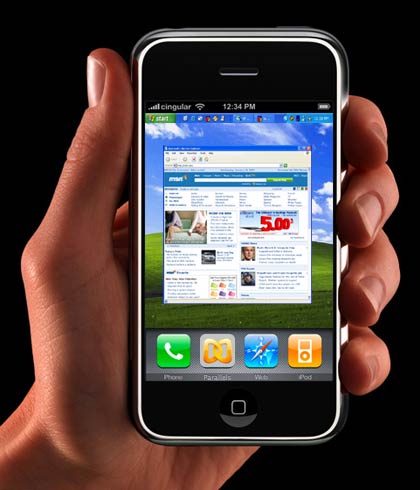 After reading Sal's thoughts post on an 18 year old that made a YouTube video about his Iphone and then was hired by Apple, it got me thinking about the students I have and their potential. I have been trying to teach them some of the new (new to me) technology I have been learning about in my Emerging Technology's class. I actually have been able to teach about some technology that students have not already used--it is hard to find something they don't already know about. For example, when we created blogs in our class, most students had used MySpace so the idea of blogging was not new to them, however, many didn't realize that is what they were doing.
I had students research three technologies and share what they had learned with the class. My posting http://radtechnobysarah.blogspot.com/2007/11/student-project-example-cont.html is an example of one student's project.
Below is the link to the Iphone video. (It takes a little time to load and it will be on the right.)
http://video.msn.com/video.aspx?mkt=en-US&brand=msnbc&vid=ebba1f75-4dd5-4eaf-a6ac-983d22539e29
Photo at http://www.kottke.org/plus/misc/images/iphone-parallels.jpg
Wednesday, November 7, 2007
Digital Community
 One topic of discussion in many of my classes is about the digital time we are in. One of my fellow classmates wrote an interesting observation on her blog Reflections of Jade about whether our class would be considered a digital community. I agree with her that even though we talk a lot about technology and being digital, we are not really a digital community. We still meet in a classroom once a week, we (sometimes) still print documents that we need to share, etc. However, I do think that I am communicating much more digitally now that my group has started our project on Collaborative Publishing. We have been using Google Docs to share info with each other. We also set up a wiki and use email. I find that I talk about digital medium more with my students, too, since starting this Emerging Technology class. However, I think we still have a ways to go to be a digital community because my high school students mainly use text messaging and their MySpace page for all of their communications.
I have been working on becoming a digital community in my high school classroom. We created blogs this semester that the students used to communicate their ideas to each other. We also use email, but this is not new for us.
An interesting definition of virtual learning communities by Patti Weeg can be found at http://www.globalclassroom.org/2004/digital_classroom/communication/virtual_community_pw.html
"Virtual learning communities sustain ongoing collaboration among participants who come together because of common interests or goals. These participants may be physically located anywhere in the world. As in any learning community, the online learning community provides services and a support system for those who belong to it. Collaboration over time is a major component of the online learning community. Motivation for all learners is high because there is an audience and a purpose for student project work." This site also has many other links to projects that schools can participate in.
Photo at http://www.intel.com/technology/magazine/pix/cm09053_g1.gif
Monday, November 5, 2007
ID Project
I have been spending a lot of my time lately on my ID project for my Instructional Design class. I am taking a four day lesson about database tables to enter new fields and creating a complete guide of instruction. It has me thinking about some of the other lessons I teach that need to be revamped. I am not sure when I could spend the amount of time on these other lessons like I am spending for this one field table lesson. I would never get around to teaching lessons if I took this long to develop lessons every time. I do, however, think that it is good to go back to old lessons (that I will use again) and see if the goals I had for the lesson were actually accomplished by the end of the lesson. We use pre and post tests for several of our courses that are suppose to help us determine if students have learned the content for units at an eighty percent efficiency rate. We than report this rate for No Child Left Behind.
Monday, October 29, 2007
Second Podcast Finished
Go check out my second podcast about blogging. This episode discusses what students might want to have on their blog and some of the tools bloggers use to create the look they are going for. Let me know what you think by leaving a comment either here or at podbean.
http://levendusky.podbean.com/
Go check out a few more of my students' blogs.
http://jenniferhcomputersii.blogspot.com/
http://austinkcomputerstudent.blogspot.com/
http://gretan33.blogspot.com/
http://laynem.blogspot.com/

One of the themes for this podcast was what did the students like about blogs and what did they want to see in a blog. I hoped this would inspire some dialog between students. They do get a lot of good ideas from each other that I could never come up with.
Photo at http://business.missouri.edu/457/204.jpg
http://levendusky.podbean.com/
Go check out a few more of my students' blogs.
http://jenniferhcomputersii.blogspot.com/
http://austinkcomputerstudent.blogspot.com/
http://gretan33.blogspot.com/
http://laynem.blogspot.com/

One of the themes for this podcast was what did the students like about blogs and what did they want to see in a blog. I hoped this would inspire some dialog between students. They do get a lot of good ideas from each other that I could never come up with.
Photo at http://business.missouri.edu/457/204.jpg
Friday, October 26, 2007
Zoho
 Well, for my collaborative publishing group project I am looking at what Zoho.com can offer us. So far I am overwhelmed with all of the possibilities. You could basically do everything you needed to do in business: run a show, keep track of meetings, have meetings, present and store data, make a wiki, and much more. This seems like it would be great for people who travel and need to show presentations to clients but don't really need to use a certain type of software to make the presentations. You can also share your work with others and give them access to collaborate with you on the project. I am not sure yet how I am going to use it in my group project but the ideas are being generated. I watched a few short videos describing the different items you can do in Zoho. I found that better than reading a description of what the part can do. Check it for yourself at http://www.zoho.com/
Monday, October 22, 2007
Google Docs
 This past week I have been working on my Collaborative Publishing Group Project. We started a Google doc to share info with each other. If you have never used Google Docs go to http://www.google.com/google-d-s/intl/en/tour1.html for a tour.
Below is what I have added to our groups Google doc so far:
examples of collaborative publishing http://strange.corante.com/archives/2007/02/26/open_publishing_collaborative_writing.php ebook idea
http://drupal.org/node/284
Photo at http://www.gustavocoronel.com.ar/local/cache-vignettes/L150xH121/arton769-1702a.jpg
Tuesday, October 16, 2007
Collaborative Publishing
My group in Emerging Technologies is looking into Collaborative Publishing. I have been searching for some interesting ways for people to publish collaborate on line work. A few sites that I am reading up on are:
1.http://drupal.org/about
2.http://www.adobe.com/devnet/contribute/articles/breeze_ct3_integration.html
3.http://www.exposurepress.com/
4.http://scoop.kuro5hin.org/
5.http://strange.corante.com/archives/2007/02/26/open_publishing_collaborative_writing.php
If any one knows about the above types of collaborative publishing and can recommend one over the other, let me know.
1.http://drupal.org/about
2.http://www.adobe.com/devnet/contribute/articles/breeze_ct3_integration.html
3.http://www.exposurepress.com/
4.http://scoop.kuro5hin.org/
5.http://strange.corante.com/archives/2007/02/26/open_publishing_collaborative_writing.php

If any one knows about the above types of collaborative publishing and can recommend one over the other, let me know.
So far in the readings and sites I have visited, I found that the overall theme was easy of use for co-workers to communicate and work together. No more trying to schedule meetings and finding time to work as one group. People can now work on-line anytime that works for them but still be part of a group. This would have been great during my undergrad when I had all those group projects and it was hard for me to meet since I was not a traditional student that lived on campus.
Photo at http://traction.tractionsoftware.com/db/attachments/blog/50/2/CODIAKProcess.gif
Sunday, October 14, 2007
IBEA Conference
This past Friday I went to the IBEA conference in DesMoines. IBEA is Iowa Business Educators Association. This conference is set-up to network with other Business teachers and attend workshops about new or changing ideas that effect us as Business teachers. I went to a workshop on CaseGrader, go to http://www.course.com/events/webinars.cfm to read a brief description of what CaseGrader can do. It sounds like a great idea, however, my school does not have Office 2007 which is needed to make it work. I like the idea of being able to test students on the application of skills.
Thursday, October 11, 2007
Showing off my Podcast

Yesterday I showed off my Podcast to my co-workers. I got many comments, the most often was "it so cute". I am not sure if that was the reaction I was going for but it is nice to hear that it sounded OK from someone other than my husband. Several people are looking towards my second podcast. I really think that I might use these in my class next semester when we start the blog unit again.
Tuesday, October 9, 2007
First Podcast about Blogging in the Classroom
Go check out my first podcast at http://levendusky.podbean.com/
It is all about what responsibilities my students have when they blog for our class projects as well as their responsibility when commenting on other students' blogs. I used several resources to create the guidelines for this project. Click the link to hear the podcast that gave me the most inspiration.
Go check out some of my students' blogs. Also, check out the comments that other students said about their postings.
http://danielleccomputerstudent.blogspot.com/
http://abbyccomputerstudent.blogspot.com/
http://asmir13.blogspot.com/
It is all about what responsibilities my students have when they blog for our class projects as well as their responsibility when commenting on other students' blogs. I used several resources to create the guidelines for this project. Click the link to hear the podcast that gave me the most inspiration.
Go check out some of my students' blogs. Also, check out the comments that other students said about their postings.
http://danielleccomputerstudent.blogspot.com/
http://abbyccomputerstudent.blogspot.com/
http://asmir13.blogspot.com/
Subscribe to:
Posts (Atom)


